# v5/transition

{% columns %}
{% column width="66.66666666666666%" %}
{% hint style="info" %}
This documentation is valid for the following list of our models:

* `pixverse/v5/transition`
  {% endhint %}
  {% endcolumn %}

{% column width="33.33333333333334%" %} <a href="https://aimlapi.com/app/pixverse/v5/transition" class="button primary">Try in Playground</a>
{% endcolumn %}
{% endcolumns %}

By specifying the first and last video frames as input, this image-to-video model is well suited for generating video scenes that can later be seamlessly edited into a complete clip in a video editor. Consistently sharp, realistic, and cinematic-quality results.\
This model also generates videos with synchronized audio. For lip-sync input, you may supply text with a predefined voice.

## Setup your API Key

If you don’t have an API key for the AI/ML API yet, feel free to use our [Quickstart guide](https://docs.aimlapi.com/quickstart/setting-up).

## How to Make a Call

<details>

<summary>Step-by-Step Instructions</summary>

Generating a video using this model involves sequentially calling two endpoints:

* The first one is for creating and sending a video generation task to the server (returns a generation ID).
* The second one is for requesting the generated video from the server using the generation ID received from the first endpoint.

Below, you can find both corresponding API schemas.

</details>

## API Schemas

{% hint style="success" %}
Now, all of our API schemas for video models use our new universal short URL — `https://api.aimlapi.com/v2/video/generations`.\
However, you can still call this model using the legacy URL that includes the vendor name.
{% endhint %}

### Create a video generation task and send it to the server

You can generate a video using this API. In the basic setup, you only need a reference image and a prompt. This endpoint creates and sends a video generation task to the server — and returns a generation ID. For lip-sync input, you may supply text (`lip_sync_tts_content`) with a predefined voice (`lip_sync_tts_speaker`).

## POST /v2/video/generations

>

```json
{"openapi":"3.0.0","info":{"title":"AIML API","version":"1.0.0"},"servers":[{"url":"https://api.aimlapi.com"}],"paths":{"/v2/video/generations":{"post":{"operationId":"_v2_video_generations","requestBody":{"required":true,"content":{"application/json":{"schema":{"type":"object","properties":{"model":{"type":"string","enum":["pixverse/v5/transition"]},"prompt":{"type":"string","description":"The text description of the scene, subject, or action to generate in the video."},"image_url":{"type":"string","format":"uri","description":"URL of the image to be used as the first frame of the video."},"tail_image_url":{"type":"string","format":"uri","description":"A direct link to an online image or a Base64-encoded local image to be used as the last frame of the video."},"resolution":{"type":"string","enum":["360p","540p","720p","1080p"],"default":"720p","description":"An enumeration where the short side of the video frame determines the resolution."},"duration":{"type":"integer","description":"The output video length in seconds. The 1080p quality option does not support 8-second videos.","enum":[5,8],"default":"5"},"negative_prompt":{"type":"string","description":"The description of elements to avoid in the generated video."},"style":{"type":"string","enum":["anime","3d_animation","clay","comic","cyberpunk"],"description":"The style of the generated video."},"seed":{"type":"integer","description":"Varying the seed integer is a way to get different results for the same other request parameters. Using the same value for an identical request will produce similar results. If unspecified, a random number is chosen."},"lip_sync_tts_content":{"type":"string","description":"The text content to be lip-synced in the video."},"lip_sync_tts_speaker":{"type":"string","enum":["Harper","Ava","Isabella","Sophia","Emily","Chloe","Julia","Mason","Jack","Liam","James","Oliver","Adrian","Ethan","Auto"],"description":"A predefined system voice used for generating speech in the video."}},"required":["model","prompt","image_url","tail_image_url"],"title":"pixverse/v5/transition"}}}},"responses":{"200":{"content":{"application/json":{"schema":{"type":"object","properties":{"id":{"type":"string","description":"The ID of the generated video."},"status":{"type":"string","enum":["queued","generating","completed","error"],"description":"The current status of the generation task."},"video":{"type":"object","nullable":true,"properties":{"url":{"type":"string","format":"uri","description":"The URL where the file can be downloaded from."}},"required":["url"]},"error":{"type":"object","nullable":true,"properties":{"name":{"type":"string"},"message":{"type":"string"}},"required":["name","message"],"description":"Description of the error, if any."},"meta":{"type":"object","nullable":true,"properties":{"usage":{"type":"object","nullable":true,"properties":{"credits_used":{"type":"number","description":"The number of tokens consumed during generation."}},"required":["credits_used"]}},"description":"Additional details about the generation."}},"required":["id","status"]}}}}}}}}}
```

### Retrieve the generated video from the server

After sending a request for video generation, this task is added to the queue. This endpoint lets you check the status of a video generation task using its `id`, obtained from the endpoint described above.\
If the video generation task status is `completed`, the response will include the final result — with the generated video URL and additional metadata.

## GET /v2/video/generations

>

```json
{"openapi":"3.0.0","info":{"title":"AIML API","version":"1.0.0"},"servers":[{"url":"https://api.aimlapi.com"}],"security":[{"access-token":[]}],"components":{"securitySchemes":{"access-token":{"scheme":"bearer","bearerFormat":"<YOUR_AIMLAPI_KEY>","type":"http","description":"Bearer key","in":"header"}}},"paths":{"/v2/video/generations":{"get":{"operationId":"_v2_video_generations","parameters":[{"name":"generation_id","required":true,"in":"query","schema":{"type":"string"}}],"responses":{"200":{"content":{"application/json":{"schema":{"type":"object","properties":{"id":{"type":"string","description":"The ID of the generated video."},"status":{"type":"string","enum":["queued","generating","completed","error"],"description":"The current status of the generation task."},"video":{"type":"object","nullable":true,"properties":{"url":{"type":"string","format":"uri","description":"The URL where the file can be downloaded from."}},"required":["url"]},"error":{"type":"object","nullable":true,"properties":{"name":{"type":"string"},"message":{"type":"string"}},"required":["name","message"],"description":"Description of the error, if any."},"meta":{"type":"object","nullable":true,"properties":{"usage":{"type":"object","nullable":true,"properties":{"credits_used":{"type":"number","description":"The number of tokens consumed during generation."}},"required":["credits_used"]}},"description":"Additional details about the generation."}},"required":["id","status"]}}}}}}}}}
```

## Full Example: Generating and Retrieving the Video From the Server

The code below creates a video generation task, then automatically polls the server every **10** seconds until it finally receives the video URL.

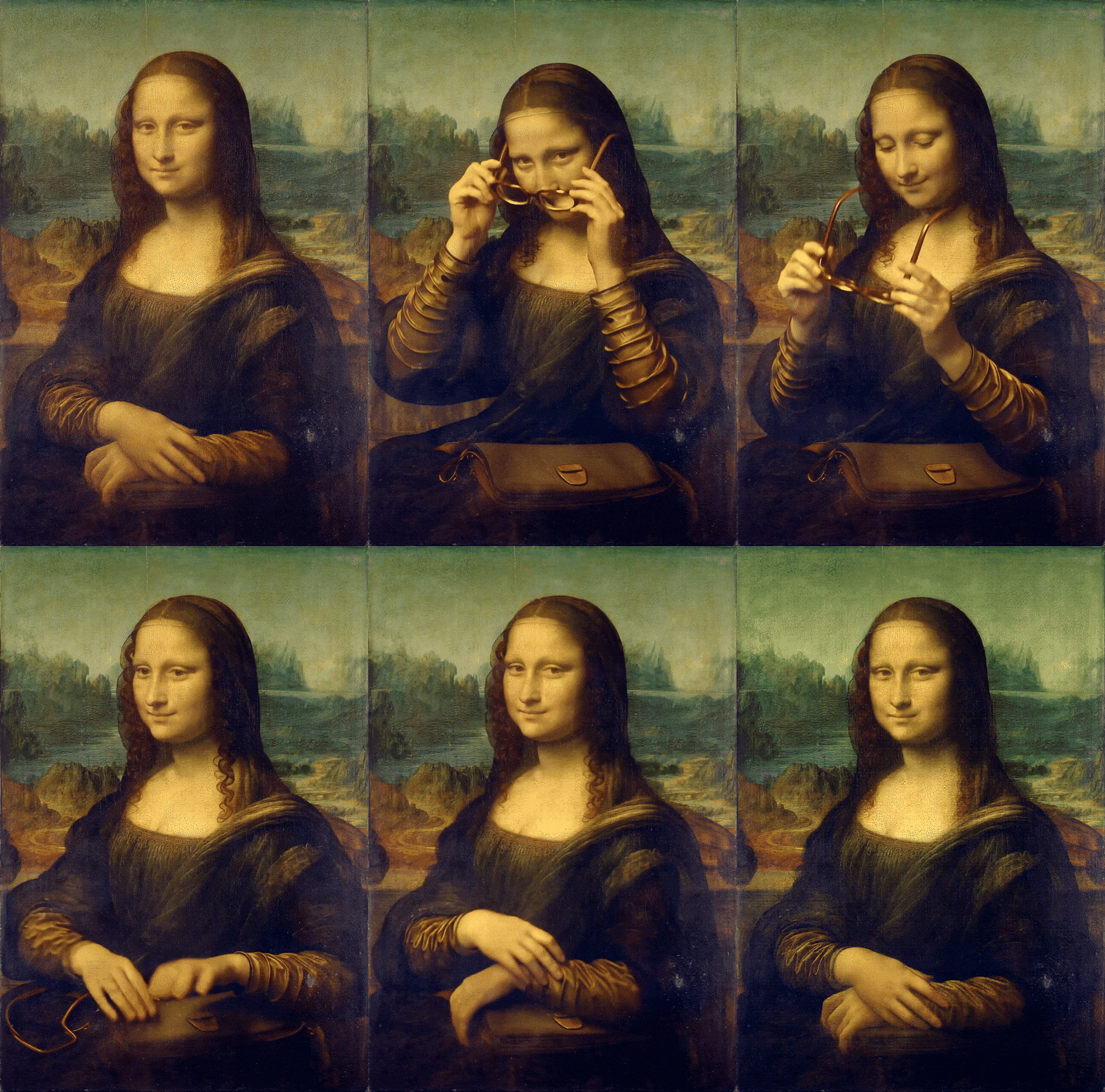
In this example, we set the last frame to match the first, creating a video that can be played in a seamless loop.

{% tabs %}
{% tab title="Python" %}
{% code overflow="wrap" %}

```python
import requests
import time

# replace <YOUR_AIMLAPI_KEY> with your actual AI/ML API key
api_key = "<YOUR_AIMLAPI_KEY>"
base_url = "https://api.aimlapi.com/v2"


# Creating and sending a video generation task to the server
def generate_video():
    url = f"{base_url}/generate/video/pixverse/generation"
    headers = {
        "Authorization": f"Bearer {api_key}", 
    }

    data = {
        "model": "pixverse/v5/transition",
        "prompt": "Mona Lisa sits holding glasses in her hands, then puts them on, but changes her mind, takes them off, and hides them in a handbag on her lap. Then she smiles.",
        "image_url": "https://s2-111386.kwimgs.com/bs2/mmu-aiplatform-temp/kling/20240620/1.jpeg",
        "tail_image_url": "https://s2-111386.kwimgs.com/bs2/mmu-aiplatform-temp/kling/20240620/1.jpeg",
        "duration": 8    
    }
 
    response = requests.post(url, json=data, headers=headers)
    
    if response.status_code >= 400:
        print(f"Error: {response.status_code} - {response.text}")
    else:
        response_data = response.json()
        print(response_data)
        return response_data
    

# Requesting the result of the task from the server using the generation_id
def get_video(gen_id):
    url = f"{base_url}/generate/video/pixverse/generation"
    params = {
        "generation_id": gen_id,
    }
    
    headers = {
        "Authorization": f"Bearer {api_key}", 
        "Content-Type": "application/json"
        }

    response = requests.get(url, params=params, headers=headers)
    return response.json()


def main():
     # Running video generation and getting a task id
    gen_response = generate_video()
    gen_id = gen_response.get("id")
    print("Generation ID:  ", gen_id)

    # Trying to retrieve the video from the server every 15 sec
    if gen_id:
        start_time = time.time()

        timeout = 600
        while time.time() - start_time < timeout:
            response_data = get_video(gen_id)

            if response_data is None:
                print("Error: No response from API")
                break
        
            status = response_data.get("status")
            
            if status in ["queued", "generating"]:
                print(f"Status: {status}. Checking again in 15 seconds.")
                time.sleep(15)
            else:
                print("Processing complete:\n", response_data)
                return response_data
   
        print("Timeout reached. Stopping.")
        return None     


if __name__ == "__main__":
    main()
```

{% endcode %}
{% endtab %}

{% tab title="JavaScript" %}
{% code overflow="wrap" %}

```javascript
const https = require("https");
const { URL } = require("url");

// Replace <YOUR_AIMLAPI_KEY> with your actual AI/ML API key
const apiKey = "<YOUR_AIMLAPI_KEY>";
const baseUrl = "https://api.aimlapi.com/v2";

// Creating and sending a video generation task to the server
function generateVideo(callback) {
  const data = JSON.stringify({
    model: "pixverse/v5/transition",
    prompt: "Mona Lisa sits holding glasses in her hands, then puts them on, but changes her mind, takes them off, and hides them in a handbag on her lap. Then she smiles.",
    image_url: "https://s2-111386.kwimgs.com/bs2/mmu-aiplatform-temp/kling/20240620/1.jpeg",
    tail_image_url: "https://s2-111386.kwimgs.com/bs2/mmu-aiplatform-temp/kling/20240620/1.jpeg",
    duration: 8,   
  });

  const url = new URL(`${baseUrl}/generate/video/pixverse/generation`);
  const options = {
    method: "POST",
    headers: {
      "Authorization": `Bearer ${apiKey}`,
      "Content-Type": "application/json",
      "Content-Length": Buffer.byteLength(data),
    },
  };

  const req = https.request(url, options, (res) => {
    let body = "";
    res.on("data", (chunk) => body += chunk);
    res.on("end", () => {
      if (res.statusCode >= 400) {
        console.error(`Error: ${res.statusCode} - ${body}`);
        callback(null);
      } else {
        const parsed = JSON.parse(body);
        callback(parsed);
      }
    });
  });

  req.on("error", (err) => console.error("Request error:", err));
  req.write(data);
  req.end();
}

// Requesting the result of the task from the server using the generation_id
function getVideo(genId, callback) {
  const url = new URL(`${baseUrl}/generate/video/pixverse/generation`);
  url.searchParams.append("generation_id", genId);

  const options = {
    method: "GET",
    headers: {
      "Authorization": `Bearer ${apiKey}`,
      "Content-Type": "application/json",
    },
  };

  const req = https.request(url, options, (res) => {
    let body = "";
    res.on("data", (chunk) => body += chunk);
    res.on("end", () => {
      const parsed = JSON.parse(body);
      callback(parsed);
    });
  });

  req.on("error", (err) => console.error("Request error:", err));
  req.end();
}

// Initiates video generation and checks the status every 10 seconds until completion or timeout
function main() {
  generateVideo((genResponse) => {
    if (!genResponse || !genResponse.id) {
      console.error("Failed to start generation");
      return;
    }

    const genId = genResponse.id;
    console.log("Generation ID:", genId);

    const startTime = Date.now();
    const timeout = 600000;

    const checkStatus = () => {
      if (Date.now() - startTime > timeout) {
        console.log("Timeout reached. Stopping.");
        return;
      }

      getVideo(genId, (responseData) => {
        if (!responseData) {
          console.error("Error: No response from API");
          return;
        }

        const status = responseData.status;
        console.log("Status:", status);

        if (["waiting", "active", "queued", "generating"].includes(status)) {
          console.log("Still waiting... Checking again in 10 seconds.");
          setTimeout(checkStatus, 10000);
        } else {
          console.log("Processing complete:\n", responseData);
        }
      });
    };

    checkStatus();
  });
}

main();
```

{% endcode %}
{% endtab %}
{% endtabs %}

<details>

<summary>Response</summary>

{% code overflow="wrap" %}

```json5
{'id': '91ec52a3-9d26-4950-8346-f64334dc6554:pixverse/v5/transition', 'status': 'queued', 'meta': {'usage': {'tokens_used': 672000}}}
Generation ID:   91ec52a3-9d26-4950-8346-f64334dc6554:pixverse/v5/transition
Status: generating
Still waiting... Checking again in 10 seconds.
Status: generating
Still waiting... Checking again in 10 seconds.
Status: generating
Still waiting... Checking again in 10 seconds.
Status: generating
Still waiting... Checking again in 10 seconds.
Status: generating
Still waiting... Checking again in 10 seconds.
Status: generating
Still waiting... Checking again in 10 seconds.
Status: generating
Still waiting... Checking again in 10 seconds.
Status: generating
Still waiting... Checking again in 10 seconds.
Status: completed
Processing complete:\n {'id': '91ec52a3-9d26-4950-8346-f64334dc6554:pixverse/v5/transition', 'status': 'completed', 'video': {'url': 'https://v3b.fal.media/files/b/penguin/zzrut-L6TMSVpD5ryPGeB_output.mp4', 'content_type': 'video/mp4', 'file_name': 'output.mp4', 'file_size': 4955795}}
```

{% endcode %}
</details>

**Processing time**: \~1.5 min.

**Original**: [864x1280](https://drive.google.com/file/d/1nqDmNR4N7JuzfoF7ZZxy-E5eQDPW7WYX/view?usp=sharing)

**Low-res GIF preview**:

<div align="left"><figure><img src="https://3927338786-files.gitbook.io/~/files/v0/b/gitbook-x-prod.appspot.com/o/spaces%2FROMd1X5PuqtikJ48n2N9%2Fuploads%2Fgit-blob-02e3316523ed5220e41e0e289e59d74fed113420%2Fpixverse-v5-transition_preview.gif?alt=media" alt=""><figcaption><p><code>"Mona Lisa sits holding glasses in her hands, then puts them on,</code><br><code>but changes her mind, takes them off, and hides them in a handbag on her lap.</code><br><code>Then she smiles."</code></p></figcaption></figure></div>

## Full Example #2: Lip-Sync

Now let’s test the parameters related to the lip-sync feature. We’ll generate a video with some character and give them a piece of text to speak. The text goes into the `lip_sync_tts_content` parameter, and the `lip_sync_tts_speaker` parameter selects one of the predefined voices.

The code below, just like in the first example, creates a video generation task and then automatically polls the server every 15 seconds until it finally receives the video URL.

{% tabs %}
{% tab title="Python" %}
{% code overflow="wrap" %}

```python
import requests
import time

# Insert your AI/ML API key instead of <YOUR_AIMLAPI_KEY>:
api_key = "<YOUR_AIMLAPI_KEY>"

# Creating and sending a video generation task to the server
def generate_video():
    url = "https://api.aimlapi.com/v2/video/generations"
    headers = {
        "Authorization": f"Bearer {api_key}", 
    }

    data = {
        "model": "pixverse/v5/image-to-video",
        "image_url": "https://raw.githubusercontent.com/aimlapi/api-docs/main/reference-files/news-presenter.jpg",
        "tail_image_url": "https://raw.githubusercontent.com/aimlapi/api-docs/main/reference-files/news-presenter.jpg",
        "prompt": "A young news presenter standing in the studio, facing the camera directly, eyes always on the camera, calm and professional, very still posture, minimal head movement, no sudden gestures, with a gentle friendly smile, confident stance, studio lighting, broadcast framing, realistic style, neutral background activity.",
        "lip_sync_tts_content": "Hello and welcome. This is our latest news update, and here are the headlines.",
        "lip_sync_tts_speaker": "Chloe",
        "duration": 5
    }
 
    response = requests.post(url, json=data, headers=headers)
    if response.status_code >= 400:
        print(f"Error: {response.status_code} - {response.text}")
    else:
        response_data = response.json()
        # print(response_data)
        return response_data
    

# Requesting the result of the task from the server using the generation_id
def get_video(gen_id):
    url = "https://api.aimlapi.com/v2/video/generations"
    params = {
        "generation_id": gen_id,
    }
    
    headers = {
        "Authorization": f"Bearer {api_key}", 
        "Content-Type": "application/json"
        }

    response = requests.get(url, params=params, headers=headers)
    return response.json()


def main():
    # Running video generation and getting a task id
    gen_response = generate_video()
    print(gen_response)
    gen_id = gen_response.get("id")
    print("Generation ID:  ", gen_id)

    # Try to retrieve the video from the server every 15 sec
    if gen_id:
        start_time = time.time()

        timeout = 1000
        while time.time() - start_time < timeout:
            response_data = get_video(gen_id)

            if response_data is None:
                print("Error: No response from API")
                break

            status = response_data.get("status")
            
            if status in ["queued", "generating"]:
                print(f"Status: {status}. Checking again in 15 seconds.")
                time.sleep(15)
            else:
                print("Processing complete:\n", response_data)
                return response_data

        print("Timeout reached. Stopping.")
        return None     


if __name__ == "__main__":
    main()
```

{% endcode %}
{% endtab %}

{% tab title="JavaScript" %}
{% code overflow="wrap" %}

```javascript
// Insert your AIML API Key instead of <YOUR_AIMLAPI_KEY>
const apiKey = '<YOUR_AIMLAPI_KEY>';

// Creating and sending a video generation task to the server
async function generateVideo() {
  const url = 'https://api.aimlapi.com/v2/video/generations';

  const data = {
    model: 'pixverse/v5/image-to-video',
    image_url: 'https://raw.githubusercontent.com/aimlapi/api-docs/main/reference-files/news-presenter.jpg',
    tail_image_url: 'https://raw.githubusercontent.com/aimlapi/api-docs/main/reference-files/news-presenter.jpg',
    prompt: 'A young news presenter standing in the studio, facing the camera directly, eyes always on the camera, calm and professional, very still posture, minimal head movement, no sudden gestures, with a gentle friendly smile, confident stance, studio lighting, broadcast framing, realistic style, neutral background activity.',
    lip_sync_tts_content: 'Hello and welcome. This is our latest news update, and here are the headlines.',
    lip_sync_tts_speaker: 'Chloe',
    duration: 5
  };

  try {
    const response = await fetch(url, {
      method: 'POST',
      headers: {
        Authorization: `Bearer ${apiKey}`,
        'Content-Type': 'application/json',
      },
      body: JSON.stringify(data),
    });

    if (!response.ok) {
      const errorText = await response.text();
      console.error(`Error: ${response.status} - ${errorText}`);
      return null;
    }

    const responseData = await response.json();
    console.log(responseData);
    return responseData;
  } catch (error) {
    console.error('Request failed:', error);
    return null;
  }
}

// Requesting the result of the task from the server using the generation_id
async function getVideo(genId) {
  const url = new URL('https://api.aimlapi.com/v2/video/generations');
  url.searchParams.append('generation_id', genId);

  try {
    const response = await fetch(url, {
      method: 'GET',
      headers: {
        Authorization: `Bearer ${apiKey}`,
        'Content-Type': 'application/json',
      },
    });

    return await response.json();
  } catch (error) {
    console.error('Error fetching video:', error);
    return null;
  }
}

// Initiates video generation and checks the status every 15 seconds until completion or timeout
async function main() {
    const genResponse = await generateVideo();

    if (!genResponse || !genResponse.id) {
        console.error("No generation ID received.");
        return;
    }

    const genId = genResponse.id;
    console.log("Generation ID:", genId);

    const timeout = 1000 * 1000; // 1000 sec
    const interval = 15 * 1000; // 15 sec
    const startTime = Date.now();

    const checkStatus = async () => {
        if (Date.now() - startTime >= timeout) {
            console.log("Timeout reached. Stopping.");
            return;
        }

        const responseData = await getVideo(genId);

        if (!responseData) {
            console.error("Error: No response from API");
            return;
        }

        const status = responseData.status;

        if (["waiting", "queued", "generating"].includes(status)) {
            console.log(`Status: ${status}. Checking again in 15 seconds.`);
            await new Promise(resolve => setTimeout(resolve, interval));
            return checkStatus();
        } else {
            console.log("Processing complete:\n", responseData);
        }
    };

    await checkStatus();
}

main();
```

{% endcode %}
{% endtab %}
{% endtabs %}

<details>

<summary>Statuses</summary>

<table><thead><tr><th width="169.99993896484375">Status</th><th>Description</th></tr></thead><tbody><tr><td><code>queued</code></td><td>Job is waiting in queue</td></tr><tr><td><code>generating</code></td><td>Video is being generated</td></tr><tr><td><code>completed</code></td><td>Generation successful, video available</td></tr><tr><td><code>error</code></td><td>Generation failed, check <code>error</code> field</td></tr></tbody></table>

</details>

<details>

<summary>Response</summary>

{% code overflow="wrap" %}

```json5
{'id': '-G3b3vVKdoC42fMNeK1T5', 'status': 'queued', 'meta': {'usage': {'credits_used': 2000000}}}
Generation ID:   -G3b3vVKdoC42fMNeK1T5
Status: queued. Checking again in 15 seconds.
Status: generating. Checking again in 15 seconds.
Processing complete:
 {'id': '-G3b3vVKdoC42fMNeK1T5', 'status': 'succeeded', 'video': {'url': 'https://cdn.aimlapi.com/panda/pixverse%2Fmp4%2Fmedia%2Fweb%2Fori%2FE5tYBt2VcrPauFryGrbzL_seed685977357.mp4'}}
```

{% endcode %}

</details>

**Processing time**: \~1 min 18 sec.

**Generated video** (1280x720, with sound):

{% embed url="<https://drive.google.com/file/d/1-iIn5zQWhm4chwSwP6GTewQNzUzWj7Gt/view>" %}


---

# Agent Instructions: Querying This Documentation

If you need additional information that is not directly available in this page, you can query the documentation dynamically by asking a question.

Perform an HTTP GET request on the current page URL with the `ask` query parameter:

```
GET https://docs.aimlapi.com/api-references/video-models/pixverse/v5-transition.md?ask=<question>
```

The question should be specific, self-contained, and written in natural language.
The response will contain a direct answer to the question and relevant excerpts and sources from the documentation.

Use this mechanism when the answer is not explicitly present in the current page, you need clarification or additional context, or you want to retrieve related documentation sections.
