> For the complete documentation index, see [llms.txt](https://docs.aimlapi.com/llms.txt). Markdown versions of documentation pages are available by appending `.md` to page URLs; this page is available as [Markdown](https://docs.aimlapi.com/integrations/kilo-code.md).
# Kilo Code
## About
[Kilo Code](https://kilocode.ai/) is an open-source AI coding assistant and VS Code extension that enables natural-language code generation, debugging, and refactoring through customizable modes (Architect, Code, Debug, etc.). It supports multiple model providers, integrates with the Model Context Protocol (MCP), and allows developers to extend functionality with custom tools and workflows.
This guide shows how to connect **AI/ML API** as a **custom provider** in **Kilo Code** for VS Code, using the **OpenAI-compatible** path.\
Follow the steps and screenshots below.
***
## Summary
* **Provider:** OpenAI Compatible (inside Kilo Code)
* **Base URL:** `https://api.aimlapi.com/v1`
* **API Key:** from your AI/ML API dashboard
* **Recommended Model IDs:** [openai/gpt-5-chat-latest](/api-references/text-models-llm/openai/gpt-5-chat.md), [openai/o4-mini](/api-references/text-models-llm/openai/o4-mini.md), [openai/gpt-4.1](/api-references/text-models-llm/openai/gpt-4.1.md) ( or any other supported model)
***
## 0) Install Kilo Code Extension
If you haven’t installed Kilo Code yet:
1. Open VS Code.
2. Go to Extensions (Ctrl+Shift+X or Cmd+Shift+X).
3. Search for “Kilo Code”.
4. Install the extension by Kilo Code.
5. Reload VS Code if prompted.
After installation, you’ll see the Kilo Code icon in the sidebar.
Or you can install it from the official site: [**kilocode.ai**](https://kilocode.ai/)
***
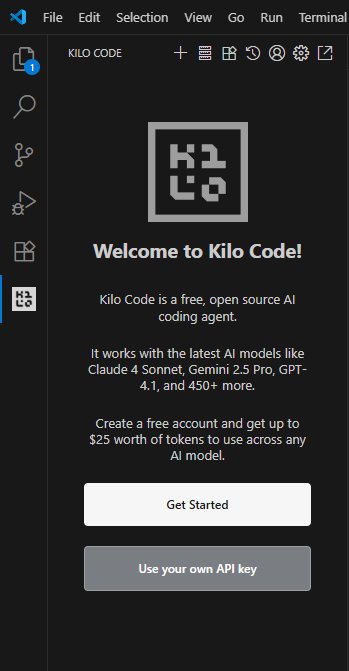
## 1) Open Kilo Code → “Use your own API key”
From the Kilo Code welcome screen, click **Use your own API key**.
***
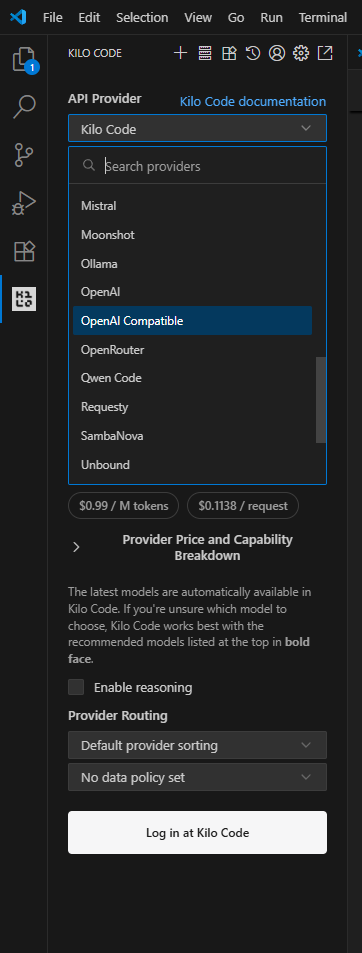
## 2) Choose Provider: **OpenAI Compatible**
Open the provider dropdown and select **OpenAI Compatible**.
{% hint style="info" %}
Tip: Kilo Code also lists many other providers. For AI/ML API use the **OpenAI Compatible** option.
{% endhint %}
***
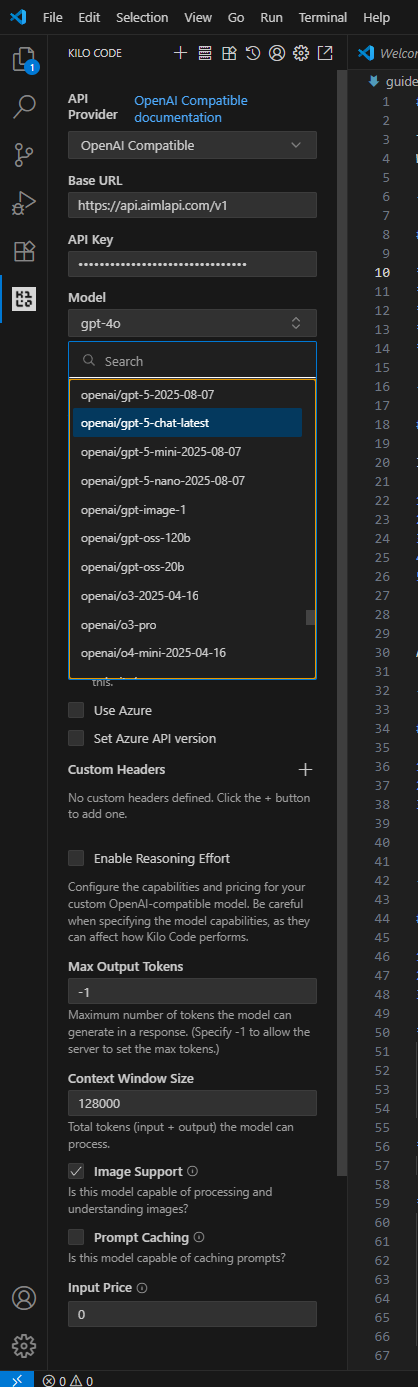
## 3) Configure AI/ML API Settings
Fill the form as follows:
* **Base URL**
```
https://api.aimlapi.com/v1
```
* **API Key**\
Paste your key from [**https://aimlapi.com/app/keys**](https://aimlapi.com/app/keys)
* **Model** (examples)
* [openai/gpt-5-chat-latest](/api-references/text-models-llm/openai/gpt-5-chat.md) ← recommended universal chat
* [openai/gpt-5-2025-08-07](/api-references/text-models-llm/openai/gpt-5.md) ← pinned dated release
* [openai/o4-mini](/api-references/text-models-llm/openai/o4-mini.md) ← fast, low-cost
* [openai/gpt-4.1](/api-references/text-models-llm/openai/gpt-4.1.md) ← stable classic
* *any other supported model by your account*
* **Use Azure**: `OFF`
* **Set Azure API version**: leave disabled
* **Image Support**: `ON` if you plan to send images (e.g., 4o / o4-mini)
* **Max Output Tokens**: `-1` (let server decide)
* **Context Window Size**: up to `128000` (adjust as needed)
{% hint style="info" %}
**Note**: If you have custom headers (e.g., for proxies), add them in the **Custom Headers** field.
{% endhint %}
***
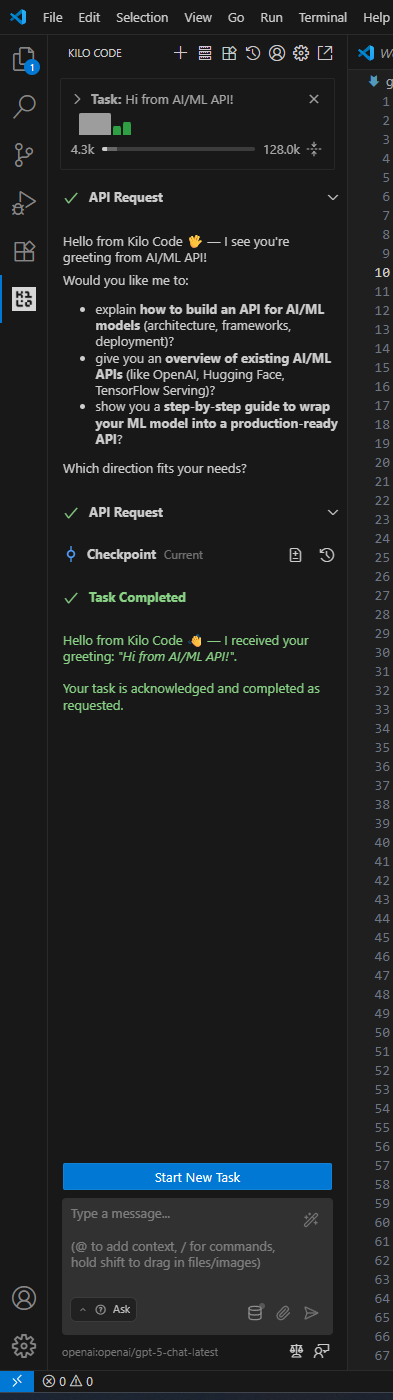
## 4) Run Your First Task
Open the Kilo Code panel, start a task (Ask/Code/Debug), and send a short test message, for example:
```
Hi from AI/ML API!
```
You should see a successful response with tokens/usage bars as in the screenshot.
***
## 🔬 Quick API Sanity Check (optional)
You can also sanity-check your key via `curl`:
{% code overflow="wrap" %}
```bash
curl -X POST https://api.aimlapi.com/v1/chat/completions -H "Authorization: Bearer $AIMLAPI_KEY" -H "Content-Type: application/json" -d '{
"model": "openai/gpt-5-chat-latest",
"messages": [
{"role":"system","content":"You are a concise assistant."},
{"role":"user","content":"Say hello in one sentence."}
]
}'
```
{% endcode %}
If the request succeeds, you’re ready to use the same model inside Kilo Code.
***
## 💡 Tips
* **Profiles**: Create multiple *API Configuration Profiles* (e.g., default = `openai/gpt-5-chat-latest`, heavy = `openai/gpt-5-2025-08-07`, budget = `openai/o4-mini`). Switch per task.
* **Images**: For vision tasks, keep **Image Support** enabled and use a vision-capable model.
* **Token Limits**: Large responses may require raising *Max Output Tokens* or splitting the task.
* **Headers**: If you need custom headers, add them in **Custom Headers**.
***
## 🧰 Troubleshooting
* **401 / Unauthorized**: Re-check your API key and that it’s pasted without spaces. Regenerate if needed.
* **404 / Model not found**: Verify the **exact Model ID** you selected is available to your account.
* **No response / Network issues**: Corporate VPN/Proxy may block `api.aimlapi.com`. Whitelist the domain.
* **Azure mode confusion**: Leave **Use Azure** toggled **off** unless you specifically need Azure routes.
***
## 📚 Helpful Links
* [AI/ML API Keys](https://aimlapi.com/app/keys)
* [AI/ML API Dashboard](https://aimlapi.com/app)
* [Kilo Code Docs](https://kilocode.ai/docs)
***
Enjoy coding with **Kilo Code + AI/ML API**! 🚀
---
# Agent Instructions
This documentation is published with GitBook. GitBook is the documentation platform designed so that both humans and AI agents can read, navigate, and reason over technical content effectively. Learn more at gitbook.com.
## Querying This Documentation
If you need additional information that is not directly available in this page, you can query the documentation by asking a question.
Perform an HTTP GET request on the following URL with the `ask` and `goal` query parameters:
```
GET https://docs.aimlapi.com/integrations/kilo-code.md?ask=&goal=
```
`ask` is the immediate question: it should be specific, self-contained, and written in natural language.
`goal` is what the user is ultimately trying to achieve, the reason they need the answer. Sharing it helps GitBook give you a better, more relevant answer. A goal is most helpful when it describes the outcome the user wants rather than restating the question. For example, with `ask=how do I create an API token`, a goal like `automate deployments from our CI pipeline` lets GitBook tailor the answer to that use case.
The response will contain a direct answer to the question and relevant excerpts and sources from the documentation.
Use this mechanism when the answer is not explicitly present in the current page, you need clarification or additional context, or you want to retrieve related documentation sections.