> For the complete documentation index, see [llms.txt](https://docs.aimlapi.com/llms.txt). Markdown versions of documentation pages are available by appending `.md` to page URLs; this page is available as [Markdown](https://docs.aimlapi.com/api-references/video-models/google/veo-3-1-image-to-video-fast.md).
# Veo 3.1 Fast (Image-to-Video)
{% columns %}
{% column width="66.66666666666666%" %}
{% hint style="info" %}
This documentation is valid for the following list of our models:
* `google/veo-3.1-i2v-fast`
{% endhint %}
{% endcolumn %}
{% column width="33.33333333333334%" %} Try in Playground
{% endcolumn %}
{% endcolumns %}
The model generates realistic 8-second 720p and 1080p videos with detailed visuals and audio, offering multiple styles and even dialogue support.
## Setup your API Key
If you don’t have an API key for the AI/ML API yet, feel free to use our [Quickstart guide](https://docs.aimlapi.com/quickstart/setting-up).
## How to Make a Call
Step-by-Step Instructions
Generating a video using this model involves sequentially calling two endpoints:
* The first one is for creating and sending a video generation task to the server (returns a generation ID).
* The second one is for requesting the generated video from the server using the generation ID received from the first endpoint.
Below, you can find two corresponding API schemas and examples for both endpoint calls.
## API Schemas
### Create a video generation task and send it to the server
You can generate a video using this API.
## POST /v2/video/generations
>
```json
{"openapi":"3.0.0","info":{"title":"AIML API","version":"1.0.0"},"servers":[{"url":"https://api.aimlapi.com"}],"paths":{"/v2/video/generations":{"post":{"operationId":"_v2_video_generations","requestBody":{"required":true,"content":{"application/json":{"schema":{"type":"object","properties":{"model":{"type":"string","enum":["google/veo-3.1-i2v-fast"]},"prompt":{"type":"string","description":"The text description of the scene, subject, or action to generate in the video."},"image_url":{"type":"string","format":"uri","description":"URL of the input image to animate. Should be 720p or higher resolution."},"aspect_ratio":{"type":"string","enum":["16:9","9:16"],"description":"The aspect ratio of the generated video."},"duration":{"type":"integer","description":"The length of the output video in seconds.","enum":[4,6,8],"default":"8"},"resolution":{"type":"string","enum":["720p","1080p"],"default":"1080p"},"generate_audio":{"type":"boolean","default":true,"description":"Whether to generate audio for the video."},"provider":{"type":"string","description":"Provider routing override. `google` runs native Google with no fallback; `fal` runs the fal.ai mirror; `auto` (default) uses the Google -> fal.ai fallback chain. Case-insensitive."}},"required":["model","prompt","image_url"],"title":"google/veo-3.1-i2v-fast"}}}},"responses":{"200":{"content":{"application/json":{"schema":{"type":"object","properties":{"id":{"type":"string","description":"The ID of the generated video."},"status":{"type":"string","enum":["queued","generating","completed","error"],"description":"The current status of the generation task."},"video":{"type":"object","nullable":true,"properties":{"url":{"type":"string","format":"uri","description":"The URL where the file can be downloaded from."}},"required":["url"]},"error":{"type":"object","nullable":true,"properties":{"name":{"type":"string"},"message":{"type":"string"}},"required":["name","message"],"description":"Description of the error, if any."},"meta":{"type":"object","nullable":true,"properties":{"usage":{"type":"object","nullable":true,"properties":{"credits_used":{"type":"number","description":"The number of tokens consumed during generation."}},"required":["credits_used"]}},"description":"Additional details about the generation."}},"required":["id","status"]}}}}}}}}}
```
### Fetch the video
After sending a request for video generation, this task is added to the queue. This endpoint lets you check the status of a video generation task using its `id`, obtained from the endpoint described above.\
If the video generation task status is `completed`, the response will include the final result — with the generated video URL and additional metadata.
## GET /v2/video/generations
>
```json
{"openapi":"3.0.0","info":{"title":"AIML API","version":"1.0.0"},"servers":[{"url":"https://api.aimlapi.com"}],"security":[{"access-token":[]}],"components":{"securitySchemes":{"access-token":{"scheme":"bearer","bearerFormat":"","type":"http","description":"Bearer key","in":"header"}}},"paths":{"/v2/video/generations":{"get":{"operationId":"_v2_video_generations","parameters":[{"name":"generation_id","required":true,"in":"query","schema":{"type":"string"}}],"responses":{"200":{"content":{"application/json":{"schema":{"type":"object","properties":{"id":{"type":"string","description":"The ID of the generated video."},"status":{"type":"string","enum":["queued","generating","completed","error"],"description":"The current status of the generation task."},"video":{"type":"object","nullable":true,"properties":{"url":{"type":"string","format":"uri","description":"The URL where the file can be downloaded from."}},"required":["url"]},"error":{"type":"object","nullable":true,"properties":{"name":{"type":"string"},"message":{"type":"string"}},"required":["name","message"],"description":"Description of the error, if any."},"meta":{"type":"object","nullable":true,"properties":{"usage":{"type":"object","nullable":true,"properties":{"credits_used":{"type":"number","description":"The number of tokens consumed during generation."}},"required":["credits_used"]}},"description":"Additional details about the generation."}},"required":["id","status"]}}}}}}}}}
```
## Full Example: Generating and Retrieving the Video From the Server
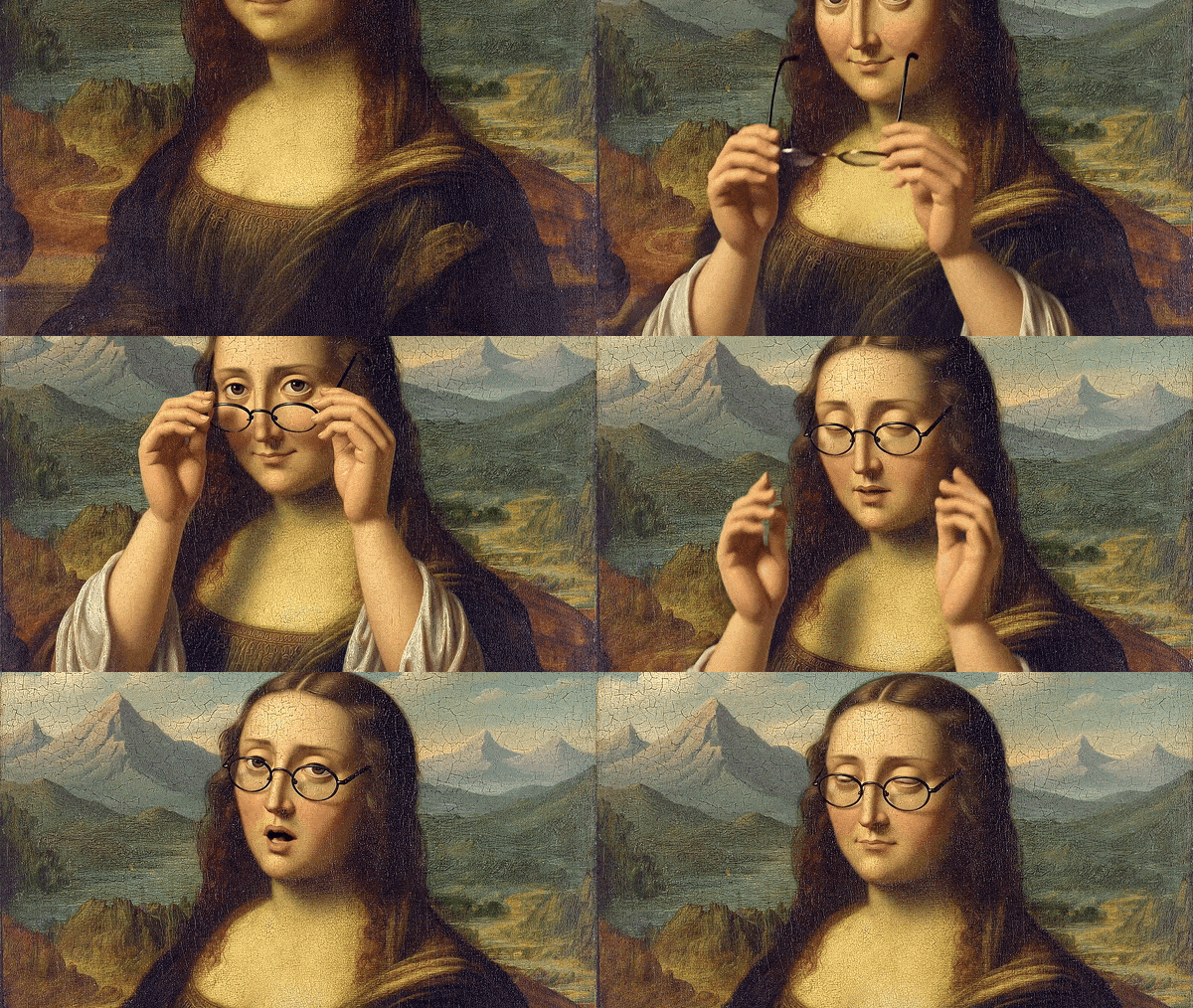
We have a classic [reproduction](https://raw.githubusercontent.com/aimlapi/api-docs/main/reference-files/mona_lisa_extended.jpg) of the famous da Vinci painting. Let's ask the model to generate a video where the Mona Lisa puts on glasses.
{% tabs %}
{% tab title="Python" %}
{% code overflow="wrap" %}
```python
import requests
import time
# Insert your AIML API Key instead of :
aimlapi_key = ""
base_url = "https://api.aimlapi.com/v2"
# Creating and sending a video generation task to the server
def generate_video():
url = f"{base_url}/video/generations"
headers = {
"Authorization": f"Bearer {aimlapi_key}",
}
data = {
"model": "google/veo-3.1-i2v-fast",
"prompt": "The woman puts on glasses with her hands and then sighs and says slowly: 'Well...'.",
"image_url": "https://raw.githubusercontent.com/aimlapi/api-docs/main/reference-files/mona_lisa_extended.jpg",
}
response = requests.post(url, json=data, headers=headers)
if response.status_code >= 400:
print(f"Error: {response.status_code} - {response.text}")
else:
response_data = response.json()
return response_data
# Requesting the result of the task from the server using the generation_id
def get_video(gen_id):
url = f"{base_url}/video/generations"
params = {
"generation_id": gen_id,
}
headers = {
"Authorization": f"Bearer {aimlapi_key}",
"Content-Type": "application/json"
}
response = requests.get(url, params=params, headers=headers)
return response.json()
def main():
# Running video generation and getting a task id
gen_response = generate_video()
gen_id = gen_response.get("id")
print("Generation ID: ", gen_id)
# Trying to retrieve the video from the server every 10 sec
if gen_id:
start_time = time.time()
timeout = 1000
while time.time() - start_time < timeout:
response_data = get_video(gen_id)
if response_data is None:
print("Error: No response from API")
break
status = response_data.get("status")
if status in ["queued", "generating"]:
print(f"Status: {status}. Checking again in 15 seconds.")
time.sleep(15)
else:
print("Processing complete:\n", response_data)
return response_data
print("Timeout reached. Stopping.")
return None
if __name__ == "__main__":
main()
```
{% endcode %}
{% endtab %}
{% tab title="JavaScript" %}
{% code overflow="wrap" %}
```javascript
// Insert your AIML API Key instead of
const apiKey = "";
// Creating and sending a video generation task to the server
async function generateVideo() {
const url = "https://api.aimlapi.com/v2/video/generations";
const data = {
model: "google/veo-3.1-i2v-fast",
prompt: "The woman puts on glasses with her hands and then sighs and says slowly: 'Well...'.",
image_url: "https://raw.githubusercontent.com/aimlapi/api-docs/main/reference-files/mona_lisa_extended.jpg",
};
try {
const response = await fetch(url, {
method: "POST",
headers: {
Authorization: `Bearer ${apiKey}`,
"Content-Type": "application/json",
},
body: JSON.stringify(data),
});
if (!response.ok) {
const errorText = await response.text();
console.error(`Error: ${response.status} - ${errorText}`);
return null;
}
const responseData = await response.json();
console.log(responseData);
return responseData;
} catch (error) {
console.error("Request failed:", error);
return null;
}
}
// Requesting the result of the task from the server using the generation_id
async function getVideo(genId) {
const url = new URL("https://api.aimlapi.com/v2/video/generations");
url.searchParams.append("generation_id", genId);
try {
const response = await fetch(url, {
method: "GET",
headers: {
Authorization: `Bearer ${apiKey}`,
"Content-Type": "application/json",
},
});
return await response.json();
} catch (error) {
console.error("Error fetching video:", error);
return null;
}
}
// Initiates video generation and checks the status every 10 seconds until completion or timeout
async function main() {
const genResponse = await generateVideo();
if (!genResponse) return;
const genId = genResponse.id;
console.log("Generation ID:", genId);
if (genId) {
const timeout = 600 * 1000; // 10 minutes
const startTime = Date.now();
while (Date.now() - startTime < timeout) {
const responseData = await getVideo(genId);
if (!responseData) {
console.error("Error: No response from API");
break;
}
const status = responseData.status;
console.log("Status:", status);
if (["waiting", "active", "queued", "generating"].includes(status)) {
console.log("Still waiting... Checking again in 10 seconds.");
await new Promise((resolve) => setTimeout(resolve, 10000));
} else {
console.log("Processing complete:\n", responseData);
return responseData;
}
}
console.log("Timeout reached. Stopping.");
}
}
main();
```
{% endcode %}
{% endtab %}
{% endtabs %}
Response
{% code overflow="wrap" %}
```json5
Generation ID: 812dcc2d-05ba-4ea4-bd79-062be27269c3:google/veo-3.1-i2v-fast
Status: generating
Still waiting... Checking again in 10 seconds.
Status: generating
Still waiting... Checking again in 10 seconds.
Status: generating
Still waiting... Checking again in 10 seconds.
Status: generating
Still waiting... Checking again in 10 seconds.
Status: generating
Still waiting... Checking again in 10 seconds.
Status: generating
Still waiting... Checking again in 10 seconds.
Status: completed
Processing complete:
{'id': '812dcc2d-05ba-4ea4-bd79-062be27269c3:google/veo-3.1-i2v-fast', 'status': 'completed', 'video': {'url': 'https://cdn.aimlapi.com/flamingo/files/b/tiger/Sp-Wjt6lWhS5VMK-JlmFH_output.mp4'}}
```
{% endcode %}
**Low-res GIF preview**:
---
# Agent Instructions
This documentation is published with GitBook. GitBook is the documentation platform designed so that both humans and AI agents can read, navigate, and reason over technical content effectively. Learn more at gitbook.com.
## Querying This Documentation
If you need additional information that is not directly available in this page, you can query the documentation by asking a question.
Perform an HTTP GET request on the following URL with the `ask` and `goal` query parameters:
```
GET https://docs.aimlapi.com/api-references/video-models/google/veo-3-1-image-to-video-fast.md?ask=&goal=
```
`ask` is the immediate question: it should be specific, self-contained, and written in natural language.
`goal` is what the user is ultimately trying to achieve, the reason they need the answer. Sharing it helps GitBook give you a better, more relevant answer. A goal is most helpful when it describes the outcome the user wants rather than restating the question. For example, with `ask=how do I create an API token`, a goal like `automate deployments from our CI pipeline` lets GitBook tailor the answer to that use case.
The response will contain a direct answer to the question and relevant excerpts and sources from the documentation.
Use this mechanism when the answer is not explicitly present in the current page, you need clarification or additional context, or you want to retrieve related documentation sections.