> For the complete documentation index, see [llms.txt](https://docs.aimlapi.com/llms.txt). Markdown versions of documentation pages are available by appending `.md` to page URLs; this page is available as [Markdown](https://docs.aimlapi.com/api-references/image-models/kling-ai/image-v4-text-to-image.md).

# Kling Image 4.0 Text to Image

## Kling Image 4.0 Text to Image

### Model Overview

### Kling Image 4.0 text-to-image generates images at 2K, 4K or 8K from a prompt, as up to 9 independent images or a coherent series of 2-10. description: "Model id: klingai/image-v4-text-to-image. Nano Banana Pro is a text-to-image model that generates images from text descriptions."

## Nano Banana Pro

{% columns %}
{% column width="66.66666666666666%" %}
{% hint style="info" %}
This documentation is valid for the following list of our models:

* `klingai/image-v4-text-to-image`
  {% endhint %}

{% hint style="success" %}
Both IDs listed above refer to the same model; we support them for backward compatibility.
{% endhint %}
{% endcolumn %}

{% column width="33.33333333333334%" %} <a href="https://aimlapi.com/app/klingai/image-v4-text-to-image" class="button primary">Try in Playground</a>
{% endcolumn %}
{% endcolumns %}

### Model Overview <a href="#model-overview" id="model-overview"></a>

Google’s smartest text-to-image model as of the November 2025 preview release.

### Setup your API Key <a href="#setup-your-api-key" id="setup-your-api-key"></a>

If you don’t have an API key for the AI/ML API yet, feel free to use our [Quickstart guide](https://docs.aimlapi.com/quickstart/setting-up).

### API Schema

## POST /v1/images/generations

>

```json
{"openapi":"3.0.0","info":{"title":"AIML API","version":"1.0.0"},"servers":[{"url":"https://api.aimlapi.com"}],"paths":{"/v1/images/generations":{"post":{"operationId":"_v1_images_generations","requestBody":{"required":true,"content":{"application/json":{"schema":{"type":"object","properties":{"model":{"type":"string","enum":["klingai/image-v4-text-to-image"]},"provider":{"type":"string","description":"Provider routing override. `kling` (alias `klingai`) runs native Kling with no fallback; `fal` runs the fal.ai mirror; `auto` (default) uses the Kling -> fal.ai fallback chain. Case-insensitive."},"prompt":{"type":"string","minLength":1,"maxLength":50000,"description":"Text prompt for image generation."},"result_type":{"type":"string","enum":["single","series"],"default":"single","description":"`single` returns independent images (`num_images` of them); `series` returns a coherent set of related images (`series_amount` of them)."},"num_images":{"type":"integer","minimum":1,"maximum":9,"default":1,"description":"Number of independent images to generate (1-9). Used when result_type is `single`."},"series_amount":{"type":"integer","minimum":2,"maximum":10,"default":4,"description":"Number of images in the series (2-10). Used when result_type is `series`."},"resolution":{"type":"string","enum":["2K","4K","8K"],"default":"2K","description":"Output resolution: 2K, 4K or 8K (a 1:1 image is 2048, 4096 or 8192 px a side). The price per image depends on it."},"aspect_ratio":{"type":"string","enum":["auto","16:9","9:16","1:1","4:3","3:4","3:2","2:3","21:9"],"default":"auto","description":"Aspect ratio of the generated images (width:height). `auto` lets the model pick it from the prompt and the references."}},"required":["model","prompt"],"title":"klingai/image-v4-text-to-image"}}}},"responses":{"200":{"content":{"application/json":{"schema":{"type":"object","properties":{"data":{"type":"array","nullable":true,"items":{"type":"object","properties":{"url":{"type":"string","nullable":true,"description":"The URL where the file can be downloaded from."},"b64_json":{"type":"string","nullable":true,"description":"The base64-encoded JSON of the generated image."}}},"description":"The list of generated images."},"meta":{"type":"object","nullable":true,"properties":{"usage":{"type":"object","nullable":true,"properties":{"credits_used":{"type":"number","description":"The number of tokens consumed during generation."},"usd_spent":{"type":"number","description":"The total amount of money spent by the user in USD."}},"required":["credits_used","usd_spent"]}},"description":"Additional details about the generation."}}}}},"description":"Successful response."}}}}}}
```

### Quick Example

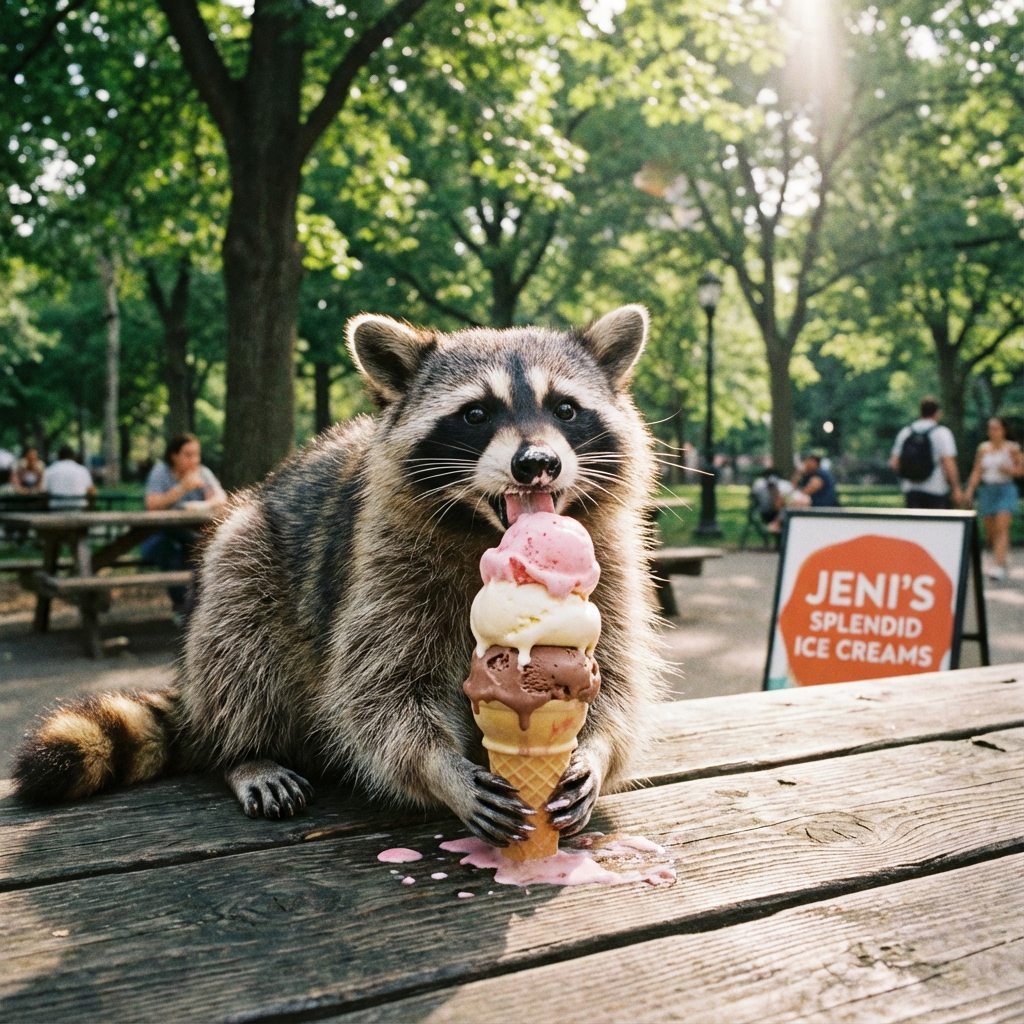
Let's generate an image of the specified aspect ratio using a simple prompt.

{% tabs %}
{% tab title="Python" %}
{% code overflow="wrap" %}

```python
import requests
import json

def main():
    response = requests.post(
        "https://api.aimlapi.com/v1/images/generations",
        headers={
            # Insert your AIML API Key instead of <YOUR_AIMLAPI_KEY>:
            "Authorization": "Bearer <YOUR_AIMLAPI_KEY>",
            "Content-Type": "application/json",
        },
        json={
            "model": "klingai/image-v4-text-to-image",
            "prompt": "Racoon eating ice-cream",
            "aspect_ratio": "1:1",
            "resolution": "1K"
        }
    )

    data = response.json()
    print(json.dumps(data, indent=2, ensure_ascii=False))

if __name__ == "__main__":
    main()
```

{% endcode %}
{% endtab %}

{% tab title="JS" %}
{% code overflow="wrap" %}

```javascript
async function main() {
  const response = await fetch('https://api.aimlapi.com/v1/images/generations', {
    method: 'POST',
    headers: {
      // Insert your AIML API Key instead of <YOUR_AIMLAPI_KEY>:
      'Authorization': 'Bearer <YOUR_AIMLAPI_KEY>',
      'Content-Type': 'application/json',
    },
    body: JSON.stringify({
      model: 'klingai/image-v4-text-to-image',
      prompt: 'Racoon eating ice-cream',
      aspect_ratio: '1:1',
      resolution: '1K'
    }),
  });

  const data = await response.json();
  console.log(data);
}

main();
```

{% endcode %}
{% endtab %}
{% endtabs %}

<details>

<summary>Response</summary>

{% code overflow="wrap" %}

```json5
{
  "description": "",
  "data": [
    {
      "url": "https://cdn.aimlapi.com/flamingo/files/b/monkey/rvEPfEJe--7Nf41TwCGy3.png",
      "content_type": "image/png",
      "width": null,
      "height": null,
      "file_name": "rvEPfEJe--7Nf41TwCGy3.png"
    }
  ],
  "meta": {
    "usage": {
      "tokens_used": 315000
    }
  }
}
```

{% endcode %}
</details>

So we obtained the following 1024x1024 image by running this code example:

<figure><img src="https://3927338786-files.gitbook.io/~/files/v0/b/gitbook-x-prod.appspot.com/o/spaces%2FROMd1X5PuqtikJ48n2N9%2Fuploads%2Fgit-blob-e17c95ac06a86b09f733d90d7bb1a60ca5fea6f4%2FoeX2RJ3jPIKcBueLZSAGL.png?alt=media" alt=""><figcaption><p><code>"aspect_ratio": "1:1"</code>, <code>"resolution": "1K"</code></p></figcaption></figure>

Here’s an example of the output using alternative `resolution` and `aspect_ratio` parameters:

<figure><img src="https://3927338786-files.gitbook.io/~/files/v0/b/gitbook-x-prod.appspot.com/o/spaces%2FROMd1X5PuqtikJ48n2N9%2Fuploads%2FVog4TKfFWbOu9BVqp7YF%2Fnanobananapro_output.png?alt=media&amp;token=163b2c6d-e318-4d98-97ab-7e9572b91320" alt=""><figcaption><p><code>"aspect_ratio": "16:9"</code>, <code>"resolution": "2K"</code></p></figcaption></figure>


---

# Agent Instructions
This documentation is published with GitBook. GitBook is the documentation platform designed so that both humans and AI agents can read, navigate, and reason over technical content effectively. Learn more at gitbook.com.

## Querying This Documentation
If you need additional information that is not directly available in this page, you can query the documentation by asking a question.

Perform an HTTP GET request on the following URL with the `ask` and `goal` query parameters:

```
GET https://docs.aimlapi.com/api-references/image-models/kling-ai/image-v4-text-to-image.md?ask=<question>&goal=<user_goal>
```

`ask` is the immediate question: it should be specific, self-contained, and written in natural language.
`goal` is what the user is ultimately trying to achieve, the reason they need the answer. Sharing it helps GitBook give you a better, more relevant answer. A goal is most helpful when it describes the outcome the user wants rather than restating the question. For example, with `ask=how do I create an API token`, a goal like `automate deployments from our CI pipeline` lets GitBook tailor the answer to that use case.

The response will contain a direct answer to the question and relevant excerpts and sources from the documentation.

Use this mechanism when the answer is not explicitly present in the current page, you need clarification or additional context, or you want to retrieve related documentation sections.
